
Spitfire22V
Well-Known Member
Hi everyone,
Though I haven't been a member here long, I’ve already seen several new threads pop up with noobs asking how to scale their armor pieces. Sometimes, they have already read the other scaling tutorials, and still have trouble. So, I thought I’d share my method for scaling that I think is relatively simple, yet effective, and it has worked for me.
For this tutorial, we’ll be scaling a forearm piece, specifically, the Mark VI low-definition forearm by Robogenesis. Also, we’ll be assuming some basic things, such as you having Pepakura Designer 3, having a ruler or some kind of measuring device, and basic knowledge of unit conversions.
I won’t go over how to lay-out the pieces and rotate them once resized so that they fit on the paper correctly, as that is covered well in another scaling tutorial (or you could Google it as well).
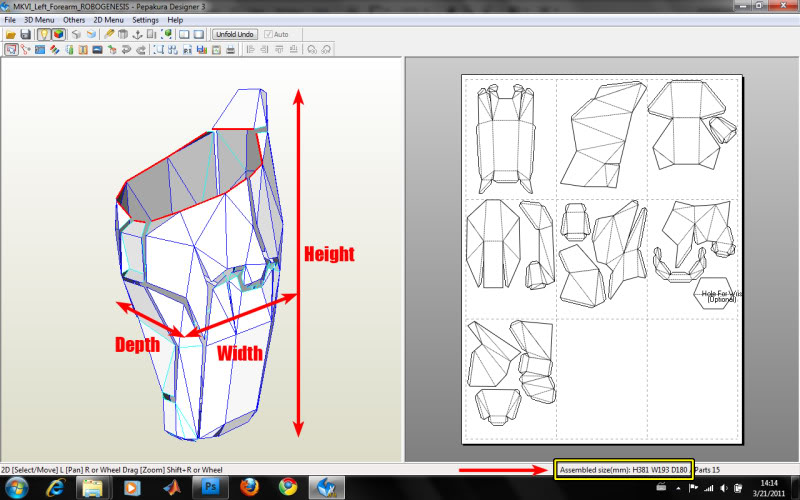
1. First, you need to understand how Pepakura’s dimensions are set-up. In the bottom right, there are the default dimensions of the piece. You need to determine the dominant axis of the piece. In this case, the height is the dominant axis (the largest dimension). For the forearm, this is the one we are most concerned about, and so it is the one we will use to alter the size of the piece. (Note: this method works almost perfectly for most pieces that have obvious dominant axes. Other pieces, like helmets or chests are a little more difficult, but the same method can be used).
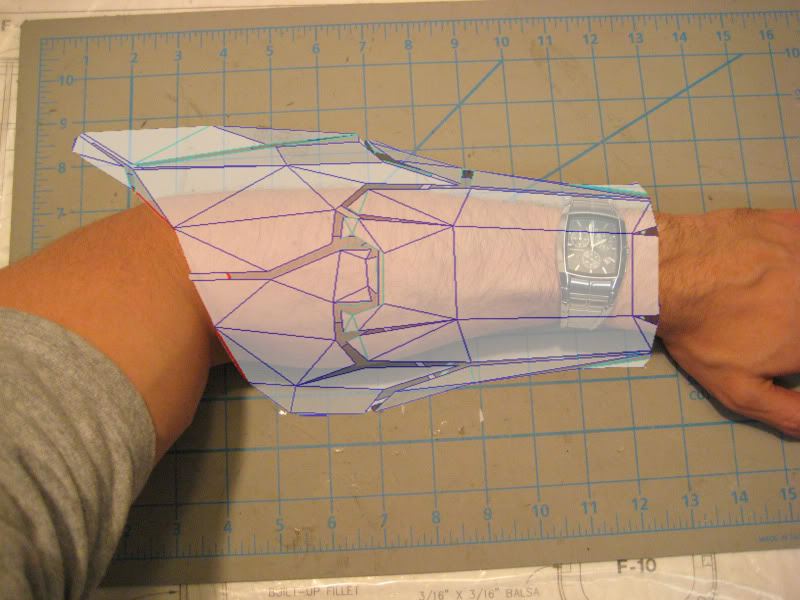
2. It is helpful to have some reference pictures so that you have an idea of how large/long the piece needs to be to look correct. For the forearm, we can’t simply measure from the elbow to the wrist since there is a piece that extends beyond the elbow. Visualize it, and try to imagine how long you want/need the piece. Don’t forget to leave some space near your joints to allow for free movement.
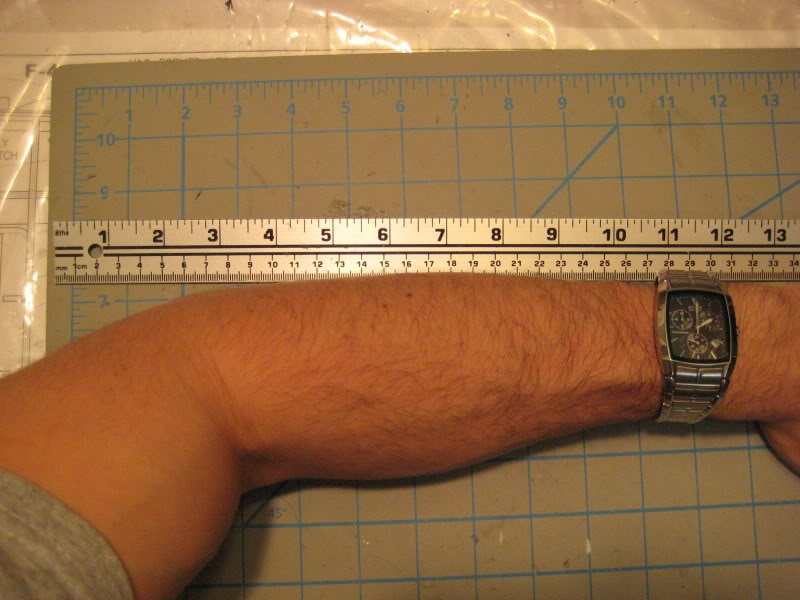
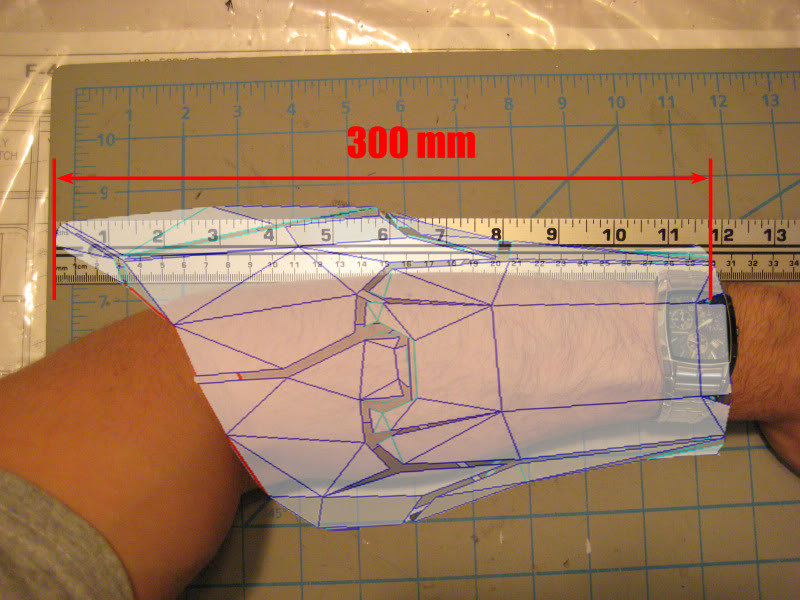
3. Get your ruler or other measuring device, and measure your forearm! In my case, I needed the forearm to be 300 millimeters long. Note: my meter stick has millimeters on it, so no conversion was needed; I simply read the dimension it needed to be. If you are using some other units, write them down, and use Google to convert them! It’s simple: all you need to type in Google is “# in to mm” and it converts it for you! Super easy!
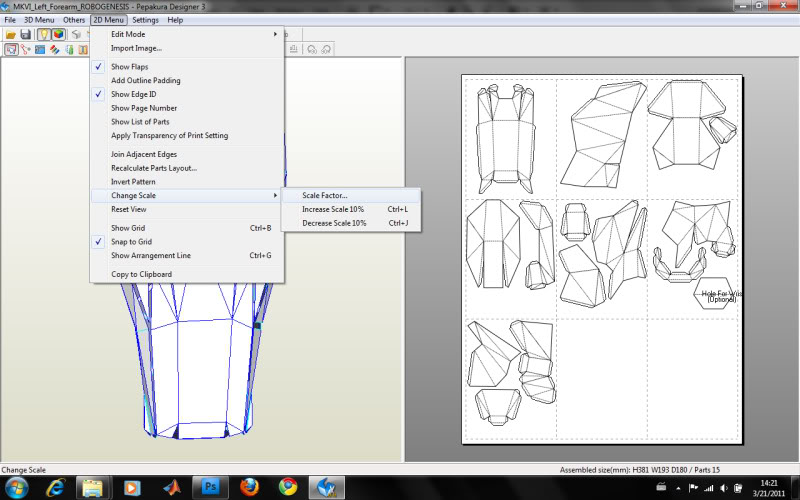
4. Finally, you need to input the measurement you just made into Pepakura. I’m using Pepakura Designer 3 (the free version), so I go to “2D Menu” --> “Change scale” --> “Scale factor”.
5. You should see this dimension window. Now, just type in your measurement into the correct dimension box! (Note: You can only change one number at a time, and the other 2 will automatically change as well. This is done to maintain the proportion of the piece). Now re-arrange the pieces to minimize the number of pages, print, and you’re ready to start making an armor piece!
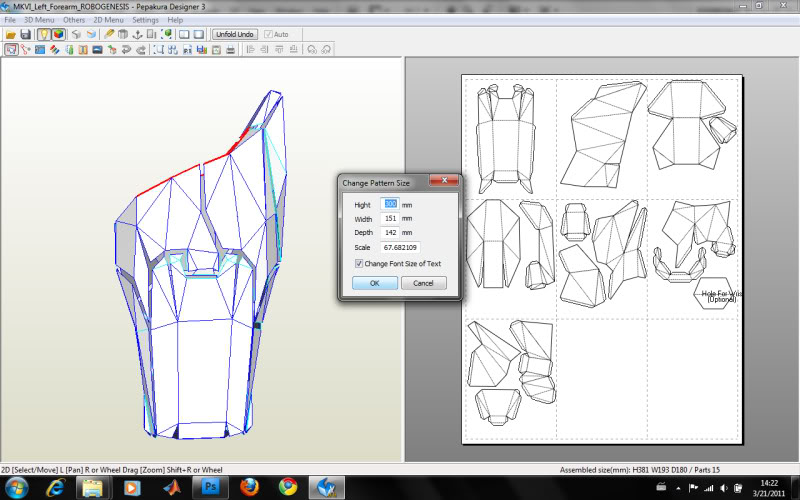
That’s pretty much it. Scaling doesn’t have to be a difficult, annoying process. What I think is good about this method is that you don’t rely on the “Scale” number in the “Change pattern size” window. If you’re using Pep armor files from different authors or armor sets, the scale numbers will be different for all of them, so you can’t rely on it. The downside is that you don’t have a universal scale number; you will have to do this process for every piece of your armor. In my opinion, a small price to pay for getting correctly sized armor on the first try, and not needing to Pep the same piece several times!
I hope this de-mystifies armor scaling somewhat! It’s not rocket science, you just have to have a basic idea of how big your armor pieces need to be, and then measure yourself. Good luck!
Though I haven't been a member here long, I’ve already seen several new threads pop up with noobs asking how to scale their armor pieces. Sometimes, they have already read the other scaling tutorials, and still have trouble. So, I thought I’d share my method for scaling that I think is relatively simple, yet effective, and it has worked for me.
For this tutorial, we’ll be scaling a forearm piece, specifically, the Mark VI low-definition forearm by Robogenesis. Also, we’ll be assuming some basic things, such as you having Pepakura Designer 3, having a ruler or some kind of measuring device, and basic knowledge of unit conversions.
I won’t go over how to lay-out the pieces and rotate them once resized so that they fit on the paper correctly, as that is covered well in another scaling tutorial (or you could Google it as well).
1. First, you need to understand how Pepakura’s dimensions are set-up. In the bottom right, there are the default dimensions of the piece. You need to determine the dominant axis of the piece. In this case, the height is the dominant axis (the largest dimension). For the forearm, this is the one we are most concerned about, and so it is the one we will use to alter the size of the piece. (Note: this method works almost perfectly for most pieces that have obvious dominant axes. Other pieces, like helmets or chests are a little more difficult, but the same method can be used).
2. It is helpful to have some reference pictures so that you have an idea of how large/long the piece needs to be to look correct. For the forearm, we can’t simply measure from the elbow to the wrist since there is a piece that extends beyond the elbow. Visualize it, and try to imagine how long you want/need the piece. Don’t forget to leave some space near your joints to allow for free movement.
3. Get your ruler or other measuring device, and measure your forearm! In my case, I needed the forearm to be 300 millimeters long. Note: my meter stick has millimeters on it, so no conversion was needed; I simply read the dimension it needed to be. If you are using some other units, write them down, and use Google to convert them! It’s simple: all you need to type in Google is “# in to mm” and it converts it for you! Super easy!
4. Finally, you need to input the measurement you just made into Pepakura. I’m using Pepakura Designer 3 (the free version), so I go to “2D Menu” --> “Change scale” --> “Scale factor”.
5. You should see this dimension window. Now, just type in your measurement into the correct dimension box! (Note: You can only change one number at a time, and the other 2 will automatically change as well. This is done to maintain the proportion of the piece). Now re-arrange the pieces to minimize the number of pages, print, and you’re ready to start making an armor piece!
That’s pretty much it. Scaling doesn’t have to be a difficult, annoying process. What I think is good about this method is that you don’t rely on the “Scale” number in the “Change pattern size” window. If you’re using Pep armor files from different authors or armor sets, the scale numbers will be different for all of them, so you can’t rely on it. The downside is that you don’t have a universal scale number; you will have to do this process for every piece of your armor. In my opinion, a small price to pay for getting correctly sized armor on the first try, and not needing to Pep the same piece several times!
I hope this de-mystifies armor scaling somewhat! It’s not rocket science, you just have to have a basic idea of how big your armor pieces need to be, and then measure yourself. Good luck!


