Diego062
New Member
Hello everyone! I'm trying to work on a cosplay project for Jorge-052 from Halo Reach as a 3D printing cosplay maker. I'm trying to strive for total accuracy; however, I ran into a problem: What is Jorge's exact spray-paint color?
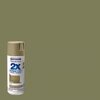
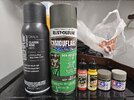
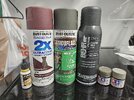
In Halo Reach, Jorge's paint tends to change its tone depending on the shade of the environment: in some shots, it's like he goes from Army Green to Olive Green, to Sage Green, and in Halo: Infinite, his armor's color appears to be a hybrid of beige and olive green. I think Infinite is the most accurate, as the light in the image is fair. But finding an exact spray can for this is difficult; Rust-Oleum and Krylon do not appear to have this exact match.
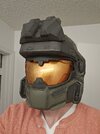
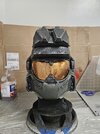
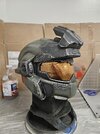
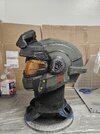
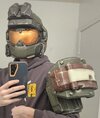
The next image is my 3D helmet (files from Galactic Armory), the shade of paint I used is Sahara beige from Montana Gold. But upon closer inspection, I can tell it's not the match for Jorge's paint. By all accounts, it seems his paint is olive green with a beige tone to it. I thought he could be a Gucamoly green color, but upon closer inspection, it doesn't have that beige tone to the color, but it seems close enough, but I'm not so sure.
Does anyone have any ideas on how to pull this off? I'd really appreciate it! It can really help with my cosplay project!


In Halo Reach, Jorge's paint tends to change its tone depending on the shade of the environment: in some shots, it's like he goes from Army Green to Olive Green, to Sage Green, and in Halo: Infinite, his armor's color appears to be a hybrid of beige and olive green. I think Infinite is the most accurate, as the light in the image is fair. But finding an exact spray can for this is difficult; Rust-Oleum and Krylon do not appear to have this exact match.
The next image is my 3D helmet (files from Galactic Armory), the shade of paint I used is Sahara beige from Montana Gold. But upon closer inspection, I can tell it's not the match for Jorge's paint. By all accounts, it seems his paint is olive green with a beige tone to it. I thought he could be a Gucamoly green color, but upon closer inspection, it doesn't have that beige tone to the color, but it seems close enough, but I'm not so sure.
Does anyone have any ideas on how to pull this off? I'd really appreciate it! It can really help with my cosplay project!